Innovative Teaching Ideas | Discovery Education Nurture Curiosity Thu, 11 Sep 2025 20:37:45 +0000 en-US hourly 1 https://wordpress.org/?v=6.8.3 Sparking Student Interest in Space https://www.discoveryeducation.com/blog/teaching-and-learning/sparking-student-interest-in-space/ Mon, 07 Apr 2025 19:23:21 +0000 https://www.discoveryeducation.com/?post_type=blog&p=183565 Thanks to numerous events occurring this school year, it’s an exciting time for those of us that teach about space and space travel! From solar eclipses to developments in NASA’s Artemis programs, this school year offers unique opportunities to spark students’ interest in our galaxy. Discovery Education has a wealth of resources to support educators […]

The post Sparking Student Interest in Space appeared first on Discovery Education.

]]>
Thanks to numerous events occurring this school year, it’s an exciting time for those of us that teach about space and space travel! From solar eclipses to developments in NASA’s Artemis programs, this school year offers unique opportunities to spark students’ interest in our galaxy.

Discovery Education has a wealth of resources to support educators teaching students about these events, as well as ways to add context to student learning by connecting scientific principles to space content.

Starting Your Space Exploration

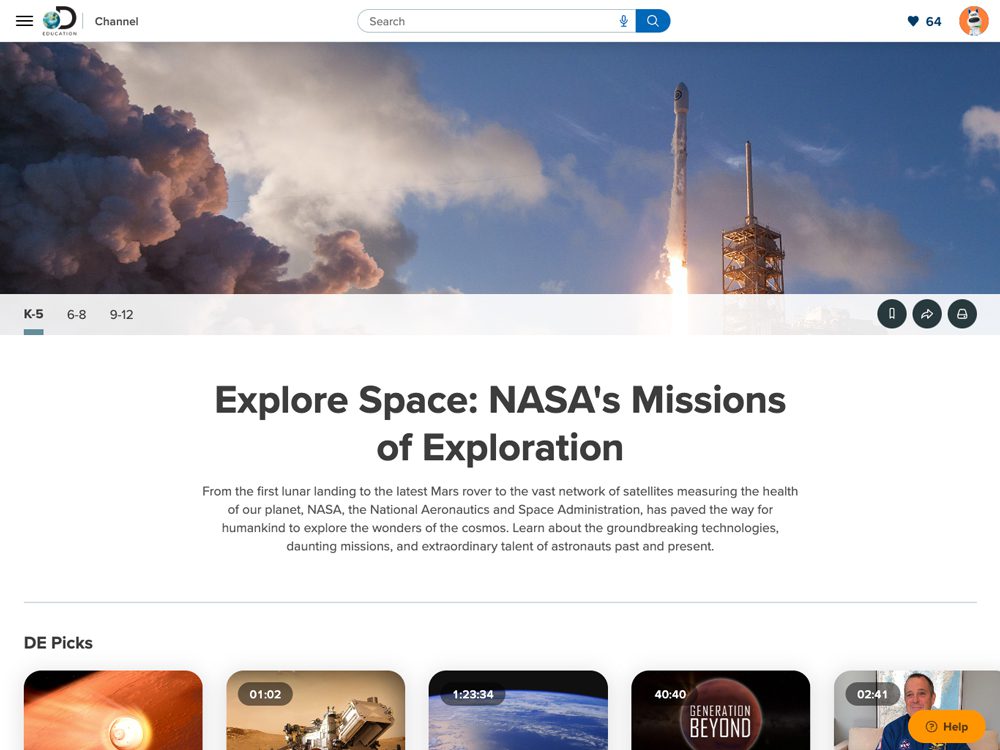
Start your space lessons with the Explore Space: NASA’s Missions of Exploration Channel, where you can find fantastic resources on popular space topics. There are great introduction videos on the James Webb Telescope, the largest, most powerful, and most technologically challenging space telescope. Understanding how this technology is used can help students consider how galaxies are studied, and then they can view images captured by this amazing telescope! This channel also includes news on the Ingenuity helicopter, which is miraculously still going strong after recently completing its 59th flight in September 2023.

For younger students, you can introduce the excitement of space with fun animated segments such as Planet Cosmo and Earth to Luna! There are many ways to make your space lessons fun, exciting, and best of all, relevant! If you aren’t sure where to infuse space content into your science lessons, finding space-related events that are coming up and using these events to build context for your students can help the introduction feel meaningful.

The upcoming Artemis missions will create a ton of excitement as the four-astronaut crew was recently named and we are moving closer to the November 2024 launch date! Discovery Education has some terrific resources to share in the Moon Channel on the historic missions to the moon, such as The Apollo Project, as well as information about the moon phases from the DEmystified series, and an overview of the partnership with NASA and SpaceX in The Future of Space Travel.

The upcoming solar eclipses are other exciting space events you can connect into your lessons! An annular solar eclipse occurred on October 14, 2023, and a total solar eclipse will occur on April 8, 2024. The Solar Eclipses Channel has great resources, videos, and activities for students in grades K-12 that both describe the natural phenomenon of an eclipse. 

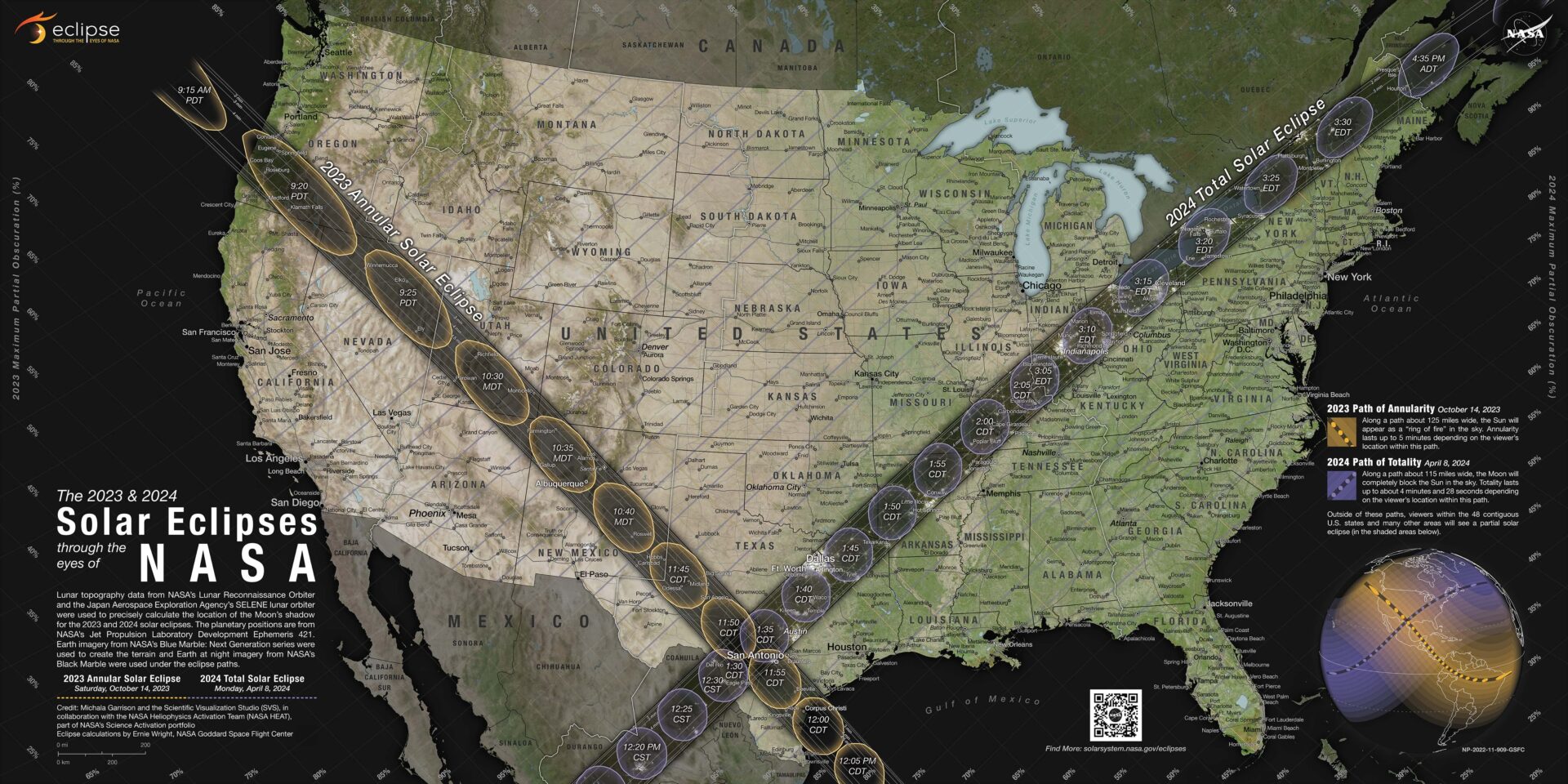
Eclipses are unique solar events, and after the April 8 total solar eclipse, the next eclipse won’t occur over the United States until 2044! Discovery Education Experience has new resources to help students explore the wonders of this upcoming eclipse such as a video on How to Safely Watch a Total Solar Eclipse, activity to create a Pinhole Projector, and a video giving students a tour of NASA’s 2024 Solar Eclipse Map. NASA is also sharing a livestream so students can watch as the total solar eclipse moves across Mexico, the United States and Canada. 

Additional Solar Eclipse Resources

facts sheet jpg

Eclipse Facts Sheet

Describes how a solar eclipse happens when the Moon moves between the Sun and Earth and about different types of solar eclipses, eclipse safety, and eclipse activities.
eclipse video jpg

Solar Eclipse Video Playlist

Videos in both English and Spanish explaining the phenomena of the "disappearing sun" and offering context about the total solar eclipse.
NASA map jpg

NASA's 2023 and 2024 Eclipse Map

Based on observations from several NASA missions, this map details the path of the Moon’s shadow as it crosses the U.S. during the annular solar eclipse in 2023 and total solar eclipse on April 8, 2024.

Creating Relevant, Fun Learning Opportunities

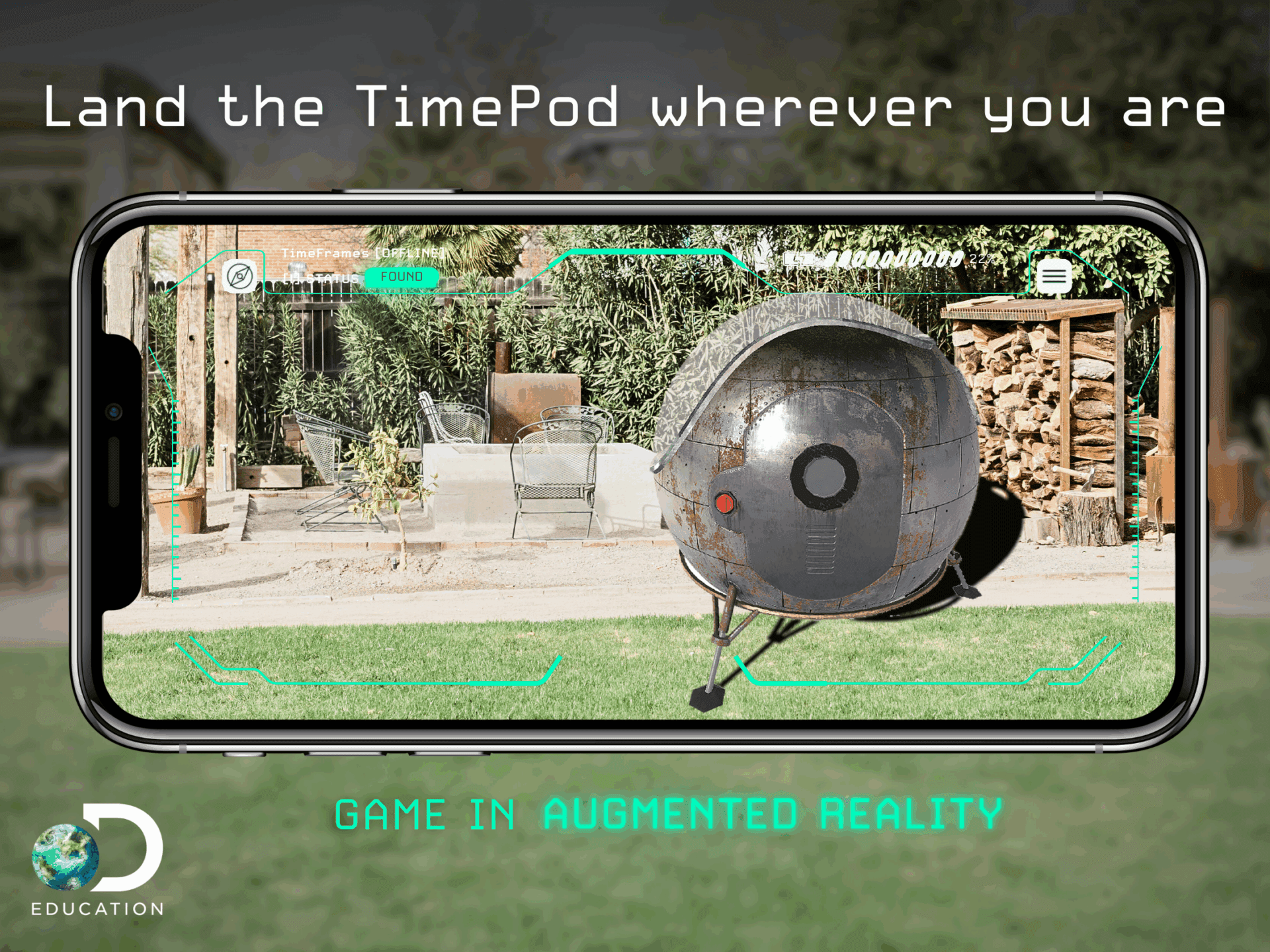
Adding a short, creative project-based learning element to your lessons around these current events can bring some additional engagement and excitement, even for students who may not think they’re passionate about space topics. For example, you can incorporate TimePod Adventures to allow students to “visit” another planet’s surface or launch and fly a rocket in HOME: Impossible Field Trip, which can bring the space concepts of a lesson to life. The AR Adventure Kit offers fun ideas that pair with the state-of-the-art, life-size augmented reality featured in TimePod Adventures.

Gamification and animation can make any topic fun and offer students a chance to use new technology tools! By using a free tool like Animate with Audio in Adobe Express, students can research a mission, planet, moon, or other phenomena and then create their own cartoon guessing game just using audio. This is always fun because the games can be played outside of the classroom with friends, family, and future students for years to come!

Resources like these are only the start, as there are so many amazing videos, articles, interactives, and more to discover. Even virtual field trips like the Journey to the Extreme: Virtual Field Trip to Mars, which includes an interview with NASA astronauts and program executives about the Curiosity mission and the ultimate goal, a journey to Mars! Start with one space lesson around a current event and create interested students who want to blast off to further exploration!

Jean Johnson

Jean Johnson

Inspire Your Students with Firsthand Accounts of Career Journeys with NASA

The post Sparking Student Interest in Space appeared first on Discovery Education.

]]>
DE-Explore-Space-NASA.jpg Solar-Eclipses-Discovery-Education.jpg facts-sheet.jpg eclipse-video.jpg NASA-map.jpg TimePod-Adventures-Augmented-Reality-App.png Jean Johnson
Sightseeing from the Comfort of Your Classroom https://www.discoveryeducation.com/blog/teaching-and-learning/sightseeing-from-the-comfort-of-your-classroom/ Fri, 04 Apr 2025 19:34:20 +0000 https://www.discoveryeducation.com/?post_type=blog&p=183562 From permission slips to headcounts, going on a field trip requires lots of planning, preparation, and time. Discovery Education’s Virtual Field Trips offer a way to bring an out-of-classroom learning experience to your students—all while saving prep and travel time! But how can a Virtual Field Trip fit into your routine? Here to share her […]

The post Sightseeing from the Comfort of Your Classroom appeared first on Discovery Education.

]]>
From permission slips to headcounts, going on a field trip requires lots of planning, preparation, and time. Discovery Education’s Virtual Field Trips offer a way to bring an out-of-classroom learning experience to your students—all while saving prep and travel time! But how can a Virtual Field Trip fit into your routine? Here to share her ideas for using these Virtual Field Trips and Live Broadcasts in your lessons is DEN STAR and Media Coordinator Renee Cunningham!

headshot scaled jpeg

Renee Cunningham

Renee Cunningham is in her 18th year in education, with 11 of those as a School Library Media Coordinator. With experience at both the elementary and middle school levels, she believes in having a lively media program that incorporates technology, STEM activities, and helps promote a lifelong love of reading. Renee is a DEN STAR, has presented at ISTE, NCTIES, and NCSLMA, and has facilitated professional development sessions for media coordinators and teachers throughout her district. ATeacher of the Year, Renee also works to be a resource and collaborator for the teachers in her building. The only thing you won’t find in our Media Center is a “quiet” sign because learning makes noise!

Over the years I have been fortunate to participate in numerous Discovery Education Virtual Field Trips. I never cease to be amazed by students’ “ah-ha” moments of connecting what they have seen in a book, on a worksheet, or in an online photo to a live video feed. From the Madden Football video game they’ve played to the stuffed polar bear they’ve read picture books about, Discovery Education’s Virtual Field Trips afford students a way to travel beyond their classroom without ever leaving their desks!

The Impact of Virtual Field Trips

I am always eager for a Virtual Field Trip reveal—and my mind immediately begins spinning on what connections I can make to the classroom content to share the experience with as many students as possible! Virtual Field Trips connect the content students are learning in a book or classroom lesson to the real world.

For instance, our first graders study animal habitats. While they have all seen a picture of a polar bear or have a stuffed bear at home, when they watch the Tundra Connections Virtual Field Trip, it helps them connect their ideas of a polar bear to actual life in the arctic!

I’m very excited for the latest Arctic Adventures Virtual Field Trip because it’s very unlikely students will ever travel to see a polar bear in their real habitat! Seeing a polar bear at the zoo in summer weather while you eat a sno-cone is one thing, but seeing the vastness of the snow-covered tundra, the real paw prints, and the way the camera bounces as the buggy rolls along offers a unique perspective. It can only be captured from that on-the-ground experience shared in the Virtual Field Trips!

Another aspect of Virtual Field Trips that I love is how they highlight unique career opportunities. The scientists and speakers in these events show that there are many career paths available to follow your passions. You love all-wheel drive and four wheelers? Maybe you could become the driver of Buggy 1 across the tundra!

Advice for Participating in a Live Broadcast

The opportunity to join a live broadcast really is unique. While there can certainly be logistical challenges like scheduling and tight instructional calendars, telling students that kids across the country are watching the same video at the same time can show that we’re all learning together! The hosts do a wonderful job of creating a personal experience by calling out schools and mentioning the question-askers by name. And as a bonus, it is an incentive for students to listen closely to not miss our school being called out!

The magic in the live broadcast is the ability to become actively involved—it makes the experience more than just watching a video. My strategy for getting my students noticed is posting lots of tweets with questions, comments, and reactions. The eruption of students hearing our school’s name called out as they watch is thrilling! 

Before the last Virtual Field Trip, I tweeted a message about our school tuning in. Imagine the students’ surprise when the broadcast started and they heard, “Mrs. Cunningham at New Town Elementary is tuning in with 1st grade!”
-Renee Cunningham

Over the years I have used the live broadcast in various ways to match our scheduling needs. Depending on the topic, we may have a grade level “viewing party” where all the classes come into the Media Center to watch together. This certainly takes some planning and agreement among the team of teachers, but when the topic is relevant to units in their curriculum, it makes the planning worth it!

I have also hosted a “working lunch” for interested students when the schedules are too tight or the topic is interesting across grades. I invite students to sign up and come to the Media Center during their lunch time to watch and eat at the same time—multitasking at its best! 

This year, skip the permission slips and bring an out-of-classroom learning opportunity to your students with a Virtual Field Trip! Participate in a live broadcast, inspire collaboration, and show your students extraordinary things that they may never experience otherwise!

The post Sightseeing from the Comfort of Your Classroom appeared first on Discovery Education.

]]>
headshot-scaled.jpeg LEGO-TILE.jpg Kids-looking-at-screen@1x_1.jpg
Making the Move to Digital Resources https://www.discoveryeducation.com/blog/teaching-and-learning/making-the-move-to-digital-resources/ Fri, 04 Apr 2025 19:34:14 +0000 https://www.discoveryeducation.com/?post_type=blog&p=183421 Trying something new in your classroom can feel invigorating, but also opens many questions: How does this compare to what I’ve been doing before? Will it make things easier or more complicated? How will it impact my students?  For Stacie Trebes, middle school teacher at Sahuarita School District, trying something new meant stepping out of […]

The post Making the Move to Digital Resources appeared first on Discovery Education.

]]>

Trying something new in your classroom can feel invigorating, but also opens many questions: How does this compare to what I’ve been doing before? Will it make things easier or more complicated? How will it impact my students? 

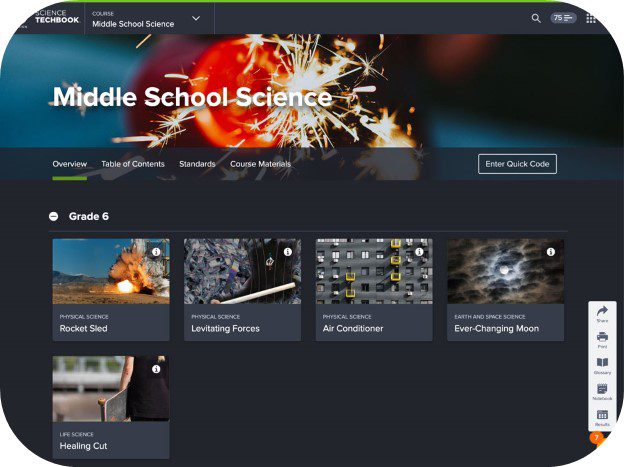
For Stacie Trebes, middle school teacher at Sahuarita School District, trying something new meant stepping out of her comfort zone and going digital. What she discovered was a new level of engagement with students and a refreshing take on teaching science. Read on to hear Stacie’s story of introducing Discovery Education Science Techbook to her middle school science classroom.

IMG 5830 2 jpg

Meet Stacie Trebes

Stacie Trebes, an esteemed educator in the Sahuarita Unified School District, brings over a decade of teaching experience to her current role. Her journey in education began as a substitute teacher, which laid the foundation for her teaching career. Stacie spent her first four years teaching second grade and later made the transition to middle school, where she began teaching science. It has been six years now in middle school, and she is thoroughly enjoying her time teaching science. Stacie finds fulfillment in working with middle school students, emphasizing the value of hands-on lab experiences that bring life to their learning. 

Besides having a blast in the classroom, Stacie Trebes enjoys spending time quality time with her family, which includes her husband and three children. She also enjoys reading, crafting, gardening, and writing children’s picture books

Stacie's Inspiration

I was inspired to become a teacher after my sister became a teacher! Seeing my sister’s work and how she connected with her students led me to join education. I’ve worked as a substitute and as a full-time classroom teacher. What inspired me to teach science was getting to explore all different aspects of science throughout the year. It’s so fun—you can teach a little bit of what you like, but then easily add things that you may not know as well. It ends up being super engaging because not only do the kids learn about a wide variety of topics and learn to love science, but the teacher also ends up loving the subject!

Teaching Science Before Science Techbook

Before Discovery Education, we had outdated textbooks that we used occasionally, but I would have to dig through websites to find supplemental materials to use in my lessons. I would hunt through a ton of sources and find things to go along with the old textbooks or create lessons entirely from scratch. With Discovery Education, everything is all in one place—right at your fingertips! I don’t have to search for lessons, texts, videos, and resources, so it’s a huge timesaver. It’s also great that the content is at the kids’ fingertips!

Introducing Digital Resources

When I heard about the research study occurring in my district, I wanted to test how effective I was at delivering digital resources. I also wanted to see how well the kids received the information from online sources and determine the actual impact of Science Techbook on my lesson planning and teaching.

Before seeing the resources, I thought that Science Techbook was going to look like a traditional textbook or workbook on a screen. I thought the students would read passages and then answer multiple-choice questions—I didn’t realize that the lessons would include videos and hands-on learning or expect such a high level of student engagement! The best surprise was that these resources can also be accessed at home. If the students’ families are curious about what they are learning, the students can show them the exact lesson we worked on, which has helped parents and families connect to our school and feel more involved in the learning process.

Discovery Education's Impact

When we were first introduced to Discovery Education, the DE team held Professional Learning sessions that explored the product from both the teacher and student perspectives. The support didn’t stop there! After those initial live sessions, they gave us ways to keep in touch, like through the help button in the platform, and they continued to check in to help us be successful in the classroom. As time passed, they added even more lessons and resources, so the DE team had another refresher course to help break down the new improvements. 

We used Science Techbook in our lessons on a weekly basis and found that the ease of using the platform was a great perk because the students quickly grasped how to find their lessons. I also realized that Discovery Education helps steer lesson planning in the right direction. It has state standards and clear learning objectives, and there are pieces to help teachers check for understanding, like assessments or exit tickets. It truly has all of the components of a good lesson!

“I knew Discovery Education’s digital resources would help strengthen students’ technology skills, but the lessons also require them to use critical thinking, data analysis, and other cross-curricular skills. I’ve seen a lot of science and social studies lessons where the students use their Language Arts skills, because students are reading and writing about history and science topics!”
- Stacie Trebes, Sahuarita Unified School District Teacher

All the resources have rigorous activities to strengthen academic skills, and they also require active participation. I’ve found that the students are really engaged from start to finish—they’re reading, they’re watching videos, and they’re interested in the curriculum. The lessons are fast paced and the students enjoy them, so the hour goes by quickly!

One surprising result of using Discovery Education was that the increased student engagement led to fewer behavior issues. Even though they have their own devices, they’re not roaming around on different websites. They’re engaged in the activities and involved in the lessons.

Lightbulb Moments

Discovery Education helped me create a heartwarming, memorable moment for my class—we had just learned about how cancer cells develop and how researchers work to fight cancer. After the video, one student raised her hand and said, “My grandma and mom both had cancer, and they both survived. This is the type of technology that worked for them!” She went on to share that this video and her personal experience had inspired her. I’m hoping that she’ll carry that inspiration into a potential career path in medicine! 

These videos and lessons can connect to students’ lives and experiences. As a science teacher, the content of your lesson very rarely connects back to the family. Many families are glad their students are enjoying science class, but Discovery Education brings a new level of personal connection to their content.

Advice to Other Educators

When you’re trying any new digital resource, take time to explore it! Exploring Discovery Education to see all of its components helped me find a wide variety of resources to use in my lessons! You’ll click on one page and there’ll be another interesting page or video—it’s almost never ending. There’s so much material that taking your time to explore the videos, assessments, and support options is the best way to become comfortable before implementing the new resources. Also, take advantage of the DE team—make sure you reach out! If you have questions, they’ll get back to you, and if they don’t know the answers, they’ll find them for you.

teachers working jpg

It’s easy to feel the weight of all the different tasks we balance as teachers, but reaching out to other teachers for advice and tips can help. When we first started using Science Techbook, there was another teacher who I noticed did more with the resources, so I asked her for help! She showed me the assessments she was using, explained how to use the different videos in my lessons, and helped me find ways to create video questions for my kids. After that conversation, I was able to go back and try something new, knowing I had someone in my corner to help when I needed it!

Whether it’s a new strategy, a new resource, or an entirely new digital curriculum, trying something new could help streamline your lesson planning and re-energize your students! With support from other teachers or a curriculum partner like Discovery Education, implementing something new in your classroom is easier than ever.

The post Making the Move to Digital Resources appeared first on Discovery Education.

]]>
IMG-5830-2.jpg New-at-DE-4.jpg teachers-working.jpg
Inspiring Student Leadership and Learning https://www.discoveryeducation.com/blog/teaching-and-learning/inspiring-student-leadership-and-learning/ Fri, 04 Apr 2025 19:34:10 +0000 https://www.discoveryeducation.com/?post_type=blog&p=183371 In school, students learn academic content, build critical thinking skills, and grow as people! To create learning experiences that accomplish this, two educators in the Verona Area School District decided to join forces. They found an innovative way to bring high school and elementary school students together through Discovery Education’s Virtual Field Trips. Meet the […]

The post Inspiring Student Leadership and Learning appeared first on Discovery Education.

]]>

In school, students learn academic content, build critical thinking skills, and grow as people! To create learning experiences that accomplish this, two educators in the Verona Area School District decided to join forces. They found an innovative way to bring high school and elementary school students together through Discovery Education’s Virtual Field Trips.

Meet the Team Behind the Magic

Rita Mortenson png

Rita Mortenson, Educational Technology Coach

I’ve been teaching for over 30 years and am currently a high school Educational Technology Coach, where I work with about 1,800 students and 200 staff members on a variety of technology topics. I’m an Apple Distinguished Educator, a Google Innovator, am ISTE certified, and love being a DEN STAR!

Lisette Venegas png

Lisette Venegas, Secondary Multilingual Programs Manager

I have been teaching for over 23 years and have taught Pre-K–4th grade, worked with multilingual and special education students, and been a library media specialist, lead teacher, instructional coach, and curriculum learning specialist. I am currently the Secondary Multilingual Programs Manager for the Verona Area School District. I truly find joy in working with the students, families, and staff on a daily basis, and being a DEN Star is amazing!

Why Virtual Field Trips?

Over the past few years, we have probably done 30 Virtual Field Trips together for a variety of grade levels. It’s really fun for students and teachers!

This started because we saw how great the Virtual Field Trips are and wanted to spread the word to other teachers. These field trips are more than just a video to show your students, and they’re more than just a part of a lesson. Working together to create these events and activities around the VFTs helps us show teachers that yes, this online content is there to engage your students, but you can build out so much more from that. And because the VFTs are embedded in Discovery Education Experience, teachers can share the VFT content with students who may have missed the hands-on experience.

Creating joy for students through these hands-on activities can help them learn new things or show what they have learned throughout a unit. For example, when elementary students completed a unit on weather, we set up an Extreme Weather VFT experience with different stations students visited with high schoolers. This experience helps teachers visualize what they can do with all of the online content they have and how to make it fun and exciting for their students.

How to Get Started

To start something like this at your school, find another teacher who is interested in trying something new. When launching new projects, it’s easier to start with a small team. Team up with one other teacher and work together to plan your first event. Interest in the events will grow as other teachers see what your students accomplish!

Our first activity used the NFL Play 60 Virtual Field Trip. Working with separate age groups (high school and elementary school), requires some brainstorming from the teachers to determine ways the content can be engaging for all students. The first year, we brought the football team to the elementary school. Today, we bring in students from different high school athletic programs and academic programs to help facilitate the activities for the younger students.

Our events start with watching the Virtual Field Trip, then rotating through a few relevant activities. To help other teachers plan these events, we created a presentation to share with other DE educators and have updated the planning into a simple process. Planning two or three stations can be a great start, and you have to be ready to brainstorm with other teachers in your school. The planning should take about an hour, but it should be fun. Once we review the content and plan the stations, away we go! At this point, we’ve done planning in as little as 20 minutes.

These events will eventually become popular in your district, so we recommend having a digital sign-up where teachers can share what topics they would like to cover and how they want to pair up the students. For example, a second-grade teacher may look at their curriculum and notice that their weather unit in November could be a great opportunity to pair up with the high school about a similar topic.

Once we identify interested teachers, we determine which school site is better equipped to host the event—the elementary or the high school. For example, the high schools often have science labs stocked with materials if the events are heavy in experiments. It takes about a month to be fully prepared because you’ll have to consider details like transportation, scheduling, and permission slips. Once we have planned the logistics, we hand the activity planning over to the older students!

"I have one student who's almost in 8th grade, and when she sees me in the building, she asks me if I remember the Virtual FieldTrip we did with her third grade class! It brings a smile to my face knowing these kids remember these events." - Lisette Venegas, Secondary Multilingual Programs Manager

Planning the Activities

We kick off the activity planning by gathering the high school students and running through a few steps to help guide them.

  1. Explain the topic that will be covered.

  2. Have the students watch the VFT and use the accompanying Studio SlideShow to help chunk out the information and pose questions throughout.

  3. Once they’ve seen the content, we encourage them to consider what types of stations to include in our collaborative event.

  4. Ask the students to design a fun, themed activity around the skills we are planning to showcase, practice, and learn that also relate to the theme of the VFT.

When we did the STEM Forward Virtual Field Trip with Olympian Katie Ledecky, we had the students decorate their own Olympic Medal to get them excited about the content. Then, after watching the Virtual Field Trip, we went into the field house where we held relay races and celebrated with the school mascot. These events include the skills from the VFT but also help build our community!

Before pairing up the right students to work together, consider the content and how different groups of high school students could share what they’re learning with the younger students.

For example, one of our first-grade classes was studying the Arctic and polar bears, so we partnered with Earth Science and Environmental Studies classes at the high school for a VFT event. We watched the Living with Polar Bears Virtual Field Trip, then had different stations set up for the students.At one station, students explored how polar bears stay warm. The students put Crisco on their hand, wrapped it in in plastic wrap, and dunked it into the bucket of ice water to simulate how blubber keeps polar bears warm. The students; eyes just lit up when they realized the ice water wasn’t cold with their layer of “blubber” and it was a great moment for them to truly understand how blubber works for polar bears!

We’re a relatively small district, and these experiences show our younger students that we are all one community, no matter the age! It’s also encouraging to see our high schoolers be leaders to our younger students, and the teachers are often impressed with their leadership skills. Showing older students that they can be leaders and help younger students make learning connections inspires them to consider their own careers as well.

Seeing these students work together so well inspires teachers to consider how they can implement hands-on learning activities along with what they’re already doing with Discovery Education, even without our help! We’ve had teachers say this is the best learning experience for their class throughout the whole year, and it’s been gaining more traction every year. Now when we walk into a school, everyone asks if we’re here for another VFT!

Advice to Other Educators

If you really want these events to take off, plan them one at a time, then share the success with others! You can share highlights from your event on social media or through your district channels to help others learn about what your students are doing. We’ve shared our success with principals, our superintendent, and the district Teaching & Learning team—word really spreads quickly! Here are our other pieces of advice for educators considering planning events like these:

  • Bring the energy! If you’re not excited about it, they won’t be, so don’t hesitate to be silly. This could end up being the event of the year for your students!

  • Don’t be afraid to think outside of the box. There are so many resources available, and you can build from there!

Virtual Field Trips bring excitement from around the world right into your classroom, but as Rita and Lisette have shown, they can also bring students together! To help your students engage with exciting content, practice academic skills, and blossom as leaders, consider planning a collaborative Virtual Field Trip event.

The post Inspiring Student Leadership and Learning appeared first on Discovery Education.

]]>
Rita-Mortenson.png Lisette-Venegas.png NFL.jpg Verona-tile-1-olympic-medal-1-scaled.jpeg verona-tile-2-blubber-scaled.jpeg
How to Develop Creative Thinking in Students with STEAM https://www.discoveryeducation.com/blog/teaching-and-learning/inspiring-creativity-in-the-classroom/ Fri, 04 Apr 2025 19:34:07 +0000 https://www.discoveryeducation.com/?post_type=blog&p=183297 Why Developing Creative Thinking in Students Matters Educators have an extraordinary opportunity to ignite a passion for learning by embracing the dynamic world of STEAM learning. Incorporating STEAM isn’t just about teaching science or math—it’s about nurturing a mindset of curiosity that empowers students to question, experiment, and grow. The beginning of the school year […]

The post How to Develop Creative Thinking in Students with STEAM appeared first on Discovery Education.

]]>

Why Developing Creative Thinking in Students Matters

Educators have an extraordinary opportunity to ignite a passion for learning by embracing the dynamic world of STEAM learning. Incorporating STEAM isn’t just about teaching science or math—it’s about nurturing a mindset of curiosity that empowers students to question, experiment, and grow.

The beginning of the school year is a great time to help students establish this mindset and begin building a culture of curiosity, creativity, and innovation in the classroom. Here are some ideas and advice from Tim Needles, a technology integration specialist, DEN STAR, and author of the book STEAM Power from ISTE, for weaving Science, Technology, Engineering, Art, and Mathematics into your classroom.

Using Curiosity to Develop Creative Thinking in Students

One of the easiest ways to get students excited about STEAM learning is through igniting their curiosity. Curiosity is an element found in professionals of every discipline! To inspire my students to think critically and creatively, I begin by modeling the behavior. I pose authentic questions about STEAM topics such as space, the future of architecture, and improving the environment, then lead students through finding resources with tools like Discovery Education to learn more about it. Showing students how to ask questions and find the answers can show them that the sky is the limit when you’re willing to search for information!

Between Discovery Education Experience and other resources, there are endless ways to find answers to your students’ questions. The key to inspiring creative thinking without overwhelming students is working as partners in the process to help find the best videos, articles, and other online resources. We explore the resources together and I find it helpful to give students multiple avenues to share so it’s not just one or two students raising their hand—we form groups so students can collaborate.

Fun STEAM Activities That Foster Creative Thinking

Another important part of a creative mindset is enjoying the process! We all remember having fun learning in the classroom as students, and a great way to introduce a fun learning activity to any level of students is through Virtual Field Trips. Some of my favorites are Living with Polar Bears in the Arctic, Generation Beyond: Mars Exploration, and STEAM Careers Take the Spotlight: Country Music’s Biggest Night. These let students have an experience together that is new and authentic, and it allows segues into all different kinds of conversations on STEAM ideas, careers, and innovations. The great thing about these Virtual Field Trips is that the students always enjoy them, and they are always a favorite, fun part of the learning.

Tie Creative Projects to Real-World Relevance

It’s particularly useful to tie learning experiences into local and community issues to connect the learning into the students’ lives. I love blending Discovery Education resources together with creative projects that encourage students to think outside the box and serve as a formative assessment. Consider how you traditionally assess student learning and add options for students that move past question-and-answer style work. Encourage students to bring their work to life by creating a structure with cardboard or writing and producing short video poems.

Use Hands-On Projects to Build Creative Thinking

Providing students with the opportunity to complete a project can help them grapple with problem-solving, making and moving past mistakes, and finding new ways to express their learning and opinions. When students learn about space exploration from the Generation Beyond: Mars Exploration Virtual Field Trip, ask them to create a cardboard structure depicting the surface of Mars, or ask students to produce a short video poem about life in the arctic after they learn about it through the Living with Polar Bears in the Arctic Virtual Field Trip. Extending learning experiences past the “new content” and into the application of knowledge through innovative projects can help students demonstrate what they’ve learned and think creatively throughout the process!

Build a Culture of Creativity and Possibility

Implementing these ideas will help you open doors to innovation, creativity, and critical thinking for your students. You can see the joy on their faces as you embark on hands-on explorations and encourage collaboration with exciting projects through a multidisciplinary lens. This year, let the spirit of STEAM infuse your classroom with boundless enthusiasm, guiding your students towards a future where possibilities are endless, and their potential knows no limits.

timneedles headshot jpeg

Tim Needles

Tim Needles is an artist, educator, performer, and author of STEAM Power: Infusing Art Into Your STEM Curriculum. He is a TEDx Talk speaker, a technology integration specialist, and teaches art, film, and emerging media at Smithtown School District and Five Towns College. His work has been featured on NPR, in the New York Times, Columbus Museum of Art, Norman Rockwell Museum, Alexandria Museum of Art, Katonah Museum of Art, and Cape Cod Museum of Art.

He’s the recipient of ISTE’s Technology in Action Award and Creativity Award, NAEA’s Eastern Region Art Educator Award & ArtEdTech Outstanding Teaching Award, and The Rauschenberg Power of Art Award. He’s also a board member of NYSCATE and NYSATA, a DEN STAR, National Geographic Certified Teacher, Kami Hero, Formative Champion, PBS Digital Innovator, a NASA Solar System Ambassador, an ISTE Community leader, NAEA ArtEdTech interest Group chair, a teacher leader in the CAN Connected Arts Network PLC, and an Adobe Creative Educator Innovator. He’s active on social media at @timneedles.

The post How to Develop Creative Thinking in Students with STEAM appeared first on Discovery Education.

]]>
Students-working-tile.jpg generation-beyond-tile.jpg timneedles-headshot.jpeg
Giving Students a Voice with SOS Strategies & Science Techbook https://www.discoveryeducation.com/blog/teaching-and-learning/giving-students-a-voice-with-sos-strategies-science-techbook/ Fri, 04 Apr 2025 19:34:04 +0000 https://www.discoveryeducation.com/?post_type=blog&p=183230 I have used Discovery Education for several years, and the gradual change to invoke students’ voices has revolutionized my classroom for the better. I have witnessed the steady improvement in my students’ writing based on “feeling” to evidence. Students apply methodical thinking and evaluation like scientists and engineers to address abstract problem solving and reflect […]

The post Giving Students a Voice with SOS Strategies & Science Techbook appeared first on Discovery Education.

]]>

I have used Discovery Education for several years, and the gradual change to invoke students' voices has revolutionized my classroom for the better.

I have witnessed the steady improvement in my students’ writing based on “feeling” to evidence. Students apply methodical thinking and evaluation like scientists and engineers to address abstract problem solving and reflect on issues with peers to develop solutions. The key component aiding my students in this process has been the scaffolding and open questioning found in DE Science Techbook and SOS Instructional Strategies

Cultivating Collaboration

Science Techbook introduces real-world phenomena that students can use their past experiences to connect to, helping them relate to the overall topic. For example, the Physical Science Unit in the 8th Grade Techbook introduces the concepts of energy through waves to produce sound with wireless speakers. My students were familiar with wireless speakers, they use them all time, but they started to pause when they had to think about the “how and why” the wireless speaker worked. This moment of reflection led to deeper thinking and collaboration that then sparked personal curiosity through questioning from the material.

When combined with collaborative strategies like the SOS Placemat Activity, students were able to bring their initial models and thoughts to a small collaborative group (which also helps greatly for students with performance anxiety). Through Placemat, they first explained their individual models of how the wireless speaker produced the music from the cellphone. Then, they deliberated in a one-group consensus model after sharing and troubleshooting with peers. This allowed my students to express themselves comfortably, raising their confidence, not only in science, but in their voices. 

Creating Classroom Culture & Building Critical Skills

Students tend to shy away from writing due to fear of being wrong or ostracized for thinking a specific way. The strategies from DE, such as Four Corners or Tweet Tweet, help alleviate those concerns. I have seen students become emboldened when they realize their responses are in line with others, and it’s amazing to see the sense of camaraderie created among the class.

This level of support blends seamlessly when it comes to written expressions of understanding like constructing explanations. Once a safe space was created with students, I introduced another SOS strategy, Quick Conference, in tandem with Science Techbook concepts. I modified it to allow students to confirm or clarify their claims and supporting evidence. The questioning allowed my students to reflect in that moment why they used the chosen evidence by explaining to peers their reasoning and thought process. When it was time for revision and closing thoughts, my students used that time to develop their reasoning based on their interviews with other students. It is a great aid to helping students build critical skills, better understand the science lessons they’re learning, and really see the bigger picture for themselves.

DE Science Techbook and SOS Instructional Strategies go hand in hand. They’ve turned my classroom into a forum of healthy discussions and empowered learners. My next plan is to expand these methods to involve parents, reinforcing the concepts learned in class and transferring them to their home and daily lives. Wish me luck!

About the Author

In addition to being a DEN STAR, Jacquelyn Freeman, teaches 8th grade science in Maryland and has a Master of Education in Educational Technology. She also serves as a Curriculum Writer, developing curricula for secondary education based on NGSS and student-centered learning strategies, as well as an 8th Grade Science Chair where she leads a team focused on creating innovative, research-based teaching strategies to encourage critical thinking in the classroom.

The post Giving Students a Voice with SOS Strategies & Science Techbook appeared first on Discovery Education.

]]>
DE-Science-Techbook-Middle-School.jpg DE-Science-Phenomena-Speaker.jpg DE-SOS-Strategies-Blog.jpg
Helping Students Master New Content and the English Language https://www.discoveryeducation.com/blog/teaching-and-learning/helping-students-master-new-content-and-the-english-language/ Fri, 04 Apr 2025 19:34:04 +0000 https://www.discoveryeducation.com/?post_type=blog&p=183231 How Do You Explain the Mitochondria to Someone Who Doesn’t Speak English? I often joke that one of the first vocabulary terms I teach my students anymore is the word, “no.” As a biology teacher, there are a myriad of words and phrases my students need to know to understand the course content. My true […]

The post Helping Students Master New Content and the English Language appeared first on Discovery Education.

]]>

How Do You Explain the Mitochondria to Someone Who Doesn’t Speak English?

I often joke that one of the first vocabulary terms I teach my students anymore is the word, “no.” As a biology teacher, there are a myriad of words and phrases my students need to know to understand the course content. My true goal as a biology teacher is to get students to connect the structure of the organelle to its function and understand how the two are related; but how does one do this for a student who needs to use translation tools to understand basic classroom discussion, let alone scientific terms?

Here are two strategies I have been implementing with my English Language Learner (ELL) students to help them acquire new vocabulary, specifically with the organelles of the cell. These strategies can also apply to many other contexts.

Strategy #1: Use Images to Make Connections

Strategy one sounds super simple because it is—use pictures! When introducing the cell, I give students a copy of the coloring sheet we will complete later in the unit and ask them to describe the structures they see in their own language, which I then translate into English. This exercise allows me to explain the organelles to students using their own words. For example, if the student says the mitochondria looks like a zapata, then I know that they think it looks like a shoe. I can then say that the laces of a shoe would be similar to structure of the cristae of the mitochondria.

Hearing the students’ own connections to the images gives me a new way of explaining the scientific terms in English. This kind of give-and-take in conversation is expanded further with my second strategy, and allows me to find common understanding with all students to help them draw their own connections.

Strategy #2: Make Learning Reciprocal

My second strategy helps everyone in the classroom learn something new—including the teacher! I call these activities “reverse vocab quizzes.” They ask students to give the teacher a word to learn when they are asked to learn new vocabulary terms in class. For example, I give my students 10 terms regarding the plant cell, and in return my ELL student(s) can give me one word from their language that I have to learn and write down when I grade their vocabulary quiz. This activity demonstrates respect for the student and their native language, and often significantly increases the culture of learning for everyone in the classroom.

When teaching new vocabulary, it is imperative that you teach the word in context rather than as an unattached, free-floating thought—in other words, students must be taught about the whole forest, not the individual trees, to wholistically understand a concept. I recently had a mid-year class change where I took over for another teacher, and when I announced that I was no longer giving weekly vocabulary quizzes, I heard cheers in each class. Vocabulary can seem daunting and confusing if it’s not offered with context or presented in ways for students to draw their own connections between new terms and their background knowledge.

For instance, if students cannot understand what the cristae are, then how can they understand what their purpose is? It’s no different for the ELL students. Giving them context can help them understand the concepts so they can make sense of the material. This is where the first strategy comes back into play—if you can explain something new in terms the student understands, they have a much better chance of understanding the concept, not just repeating words they don’t really understand. 

My biggest suggestion for helping ELL students is to do your best to meet them halfway! If you show a willingness and desire to learn their language, they’re more likely to work with you to learn English words and science words alike!

Picture of Sean O'Brien

Sean O'Brien

Sean O’Brien is a Pennsylvania high school science teacher and National Honor Society Advisor. He is a DEN STAR and Kahoot Content Creator, and he is passionate about bringing engaging science lessons to his students!

The post Helping Students Master New Content and the English Language appeared first on Discovery Education.

]]>
cell-from-product.jpg science-reading-tile.jpg Picture of Sean O'Brien
25 Ways to Use Sandbox in the Classroom https://www.discoveryeducation.com/blog/teaching-and-learning/25-ways-to-use-sandbox-in-the-classroom/ Fri, 04 Apr 2025 19:33:37 +0000 https://www.discoveryeducation.com/?post_type=blog&p=182644 Technology can be a powerful tool for deepening engagement and enhancing student understanding. From exploring ancient civilizations to creating science labs and visualizing math concepts, Sandbox empowers students to design their own virtual and AR experiences, making learning not only interactive but also personalized and unforgettable. Sandbox is available for FREE from the Apple App […]

The post 25 Ways to Use Sandbox in the Classroom appeared first on Discovery Education.

]]>

Technology can be a powerful tool for deepening engagement and enhancing student understanding. From exploring ancient civilizations to creating science labs and visualizing math concepts, Sandbox empowers students to design their own virtual and AR experiences, making learning not only interactive but also personalized and unforgettable.

Sandbox is available for FREE from the Apple App Store and the Google Play Store.

Sandbox is installed on 1.3 million devices worldwide. So, how are educators using it effectively? Below are 25 creative ways to bring Sandbox into your lessons, helping students to connect, create, and learn like never before.

25 Ways to Bring Sandbox into the Classroom

Edit Content

1. Experiential Learning: 84% of math and science teachers think that using immersive technology improves student engagement and interest. Create simulations where students interact with their environment, like exploring a model of the solar system, or setting up a science experiment.

2. Labelling: Encourage students to label parts of scenes they build, such as the anatomy of an animal or parts of a diagram, reinforcing vocabulary and concept understanding. Alternatively, teachers can provide labels in the scene for students to match to the correct objects.

3. Self-Expression: Provide a blank canvas for students to express themselves by designing their own unique spaces, reflecting their interests, culture, and personality. Sandbox’s sharing feature means students can invite one another into their virtual worlds.

4. Scavenger Hunts: Set up scavenger hunts within a scene, encouraging students to search for hidden items or clues, promoting critical thinking and teamwork.

5. Collaborative Creation: Assign groups to co-create scenes, practicing teamwork and combining individual ideas into a shared virtual space. Pass around an iPad and have each student add something new – an engaging way to set up a scene that everyone is invested in.

6. Debates: Set up virtual “stages” for debates, where students can present visual evidence to support their arguments, and fully appreciate different perspectives. Why not stage a debate among pioneers at a real location on the Oregon Trail?

7. Create Your Own Virtual Field Trips: Open up the classroom and take students on augmented reality field trips – to the zoo; to the surface of Mars; to the depths of the ocean or to the Great Pyramid of Giza! Open Sandbox and check out the ready-made locations you can visit today. 

Edit Content

8. Fractions: Visually represent fractions by sorting groups of objects into equal parts, making abstract math concepts more concrete and understandable.

9. Identify and Describe the Properties of 3D Shapes: Place different 3D shapes in scenes, allowing students to physically walk around, examine and label properties like edges, vertices, and faces.

10. Sorting/Ordering Objects: Have students organize realistic objects by size, color, or type, promoting categorization skills and logical thinking.

11. Venn Diagrams: Create a virtual Venn diagram with overlapping spaces where students can sort and place objects based on shared characteristics.

12. Measure, Add, and Subtract Lengths: Use the Sandbox AR measuring tool to compare lengths of objects in the scene, practicing real-world math skills in a hands-on way. 

13. Calculating Perimeter: Build shapes using walls and fences, walk around them in real space, and use Sandbox AR’s measuring tool to calculate perimeter, reinforcing geometry concepts through physical activity. 

Edit Content

14. Creating Poetry: Build a scene inspired by nature or emotions, then have students write poems that reflect their scene, connecting art and language through immersive experiences.

15. Storytelling: Let students create settings for their stories, imagining characters, plotlines, and outcomes, transforming their scenes into engaging narratives. 

16. Creative Writing: Spark imagination by having students explore a unique setting in Sandbox. You’ll find that true immersion leads to elevated descriptions and an emotional connection to the content. 

Edit Content

17. Historical Immersion: Recreate historical settings like ancient civilizations or landmark events to let students step into history and gain firsthand perspective. Use pre-made sandboxes to visit immersive environments such as the Roman forum or the Jamestown settlement, and stage insightful discussions about differing perspectives.

18. Religious Education: Build scenes that represent various religious buildings or traditions, allowing students to learn about and discuss different beliefs and practices in a more tangible way than ever before. Label the key symbols you find using the Text Panel tool.

19. Celebrate Calendar Events in a New Way: Design scenes that reflect seasonal changes or holidays, helping students connect with the time of year and its natural and cultural events.  

Edit Content

20. Animal Classification: Students can place animals into categories based on traits, habitats, or adaptations, building connections with biology and ecology studies.  

21. Observe Seasonal Changes: Design scenes to show the transformation of an environment over time, such as trees changing from spring blossoms to autumn leaves. 

22. Shadows: Experiment with light sources and objects in Sandbox AR to observe how shadows form and change. Place a tall object on the stage then use the Settings menu to change the sunlight angle and see what happens. 

Edit Content

23. Still Life Drawing: Use Sandbox to arrange digital still life scenes with objects that students can draw or sketch, building observational and artistic skills.

24. Create an Art Gallery: Download the free ‘Art’ content pack directly from the app, and ask students to create their very own artwork for your virtual gallery! Use text panels to create labels for the art and ask students to give you a tour around their creations.

25. Filmmaking: Have students use Sandbox AR as their set for creating short films, adding narration and music to enhance storytelling and technical skills. Sandbox AR carries a green screen feature so you can edit your own backgrounds into the film later.

Sandbox is Now Available for Chromebook!

The award-winning Sandbox app has landed on the Google Play Store for Chromebook devices, bringing immersive learning to even more classrooms!

The Chromebook version matches the beloved features of Sandbox: students can create stages, use a vast library of 3D models, explore pre-made scenes, and share their creations between devices. In Sandbox for Chromebook, students shrink themselves down into their scenes and explore them in an interactive, video-game style using a keyboard and mouse.

Designed for simple and easy access, Sandbox for Chromebook is helping us work towards every student experiencing hands-on immersive learning and exploring the universe from inside their classroom.

Sandbox AR 5 scaled

Discover more immersive learning strategies for the classroom!

The post 25 Ways to Use Sandbox in the Classroom appeared first on Discovery Education.

]]>
Sandbox-AR-5-scaled
Five Ways to Create Immersion in the Classroom https://www.discoveryeducation.com/blog/teaching-and-learning/five-ways-to-create-immersion-in-the-classroom/ Fri, 04 Apr 2025 19:33:35 +0000 https://www.discoveryeducation.com/?post_type=blog&p=182619 Educators today wear many metaphorical hats, especially as technology develops. They are expected to become film directors, vloggers, and coding experts, not to mention navigating the world of AI and feeling the burden of their students’ online safety. It can be easy to forget that a key part of the mission of educational technology (EdTech) […]

The post Five Ways to Create Immersion in the Classroom appeared first on Discovery Education.

]]>

Educators today wear many metaphorical hats, especially as technology develops. They are expected to become film directors, vloggers, and coding experts, not to mention navigating the world of AI and feeling the burden of their students’ online safety.

It can be easy to forget that a key part of the mission of educational technology (EdTech) is to create immersive experiences. In this article, we take immersion back to basics because, in truth, it’s possible to achieve immersion without any technology at all.

What Is Immersion, and Why Is It So Important?

Simply put, immersion is a feeling. It refers to an experience that deeply engages a person’s senses, emotions and attention, creating a sense of being fully surrounded and absorbed in a particular environment or activity. So, if you’ve ever read a good book, seen a particularly captivating performance, or smelled a scent that unlocked a memory, you’ve experienced immersion.

Research shows that learning gained through real experience carries far more depth and stays with us longer. On top of that, experiences which elicit an emotional response create stronger connections and memories. It is therefore beneficial to give students experiences which are personal and powerful, to amplify reactions and create long-lasting knowledge retention.

Find out more about immersion >

Educators have been teaching lessons through immersive moments for many years. The trick is to recognize an immersive moment for what it is, capture the window of opportunity, and take advantage of students’ open and receptive minds. Below, we’ll explain five of the teaching tools and techniques that every educator has at their fingertips.

de five ways blog 1

1. Use a Story

It might seem incredibly basic, but storytelling is one of the fundamental vehicles of immersion. An engaging narrative:

  • gives context to learning;
  • creates rich mental images;
  • promotes active listening;
  • arranges learning points in a way that creates connections, supporting easy recall;
  • provides a human viewpoint, and promotes understanding on a personal level;
  • prompts students to formulate opinions on the subject matter.

So, whether it’s a short tale or poem to cover in a single session, or a novel to base your entire unit of study on, I encourage you to find a narrative linked to your learning material. Don’t get hung up on how perfectly the story covers your objectives – just find something that will open students’ hearts and minds to the world inside the narrative. You’ll be amazed at the connections they’ll make between the story and the rest of your lessons.

Fuel curiosity with immersive storytelling >

de five ways blog 2

2. Stimulate the Senses

Our senses are incredibly powerful in creating memories, forming connections in our brain and developing emotional relationships. To help create lasting memories, why not try some of these ideas to amplify your learning activities?

  • Create a soundscape together by making sounds that you might hear in your chosen setting (e.g. at sea, exploring Antarctica, in ancient Rome)
  • Taste food or ingredients used by specific peoples or at key events
  • Introduce or replicate a smell that might transport students in their minds
  • Find an image, color or moodboard for students to interpret while listening to information
  • Mimic a change in temperature to help students imagine conditions somewhere else
  • Pass around an item for students to feel (e.g. the weight of a full backpack; a type of fabric; a fossil)

Research shows that cutting out one or more of our senses allows us to concentrate more on the senses available to us. Encourage students to close their eyes while listening to a story; turn out the lights or close the blinds when students are watching a video; mimic a deserted landscape by creating a prolonged, complete silence.

The Five Senses: Immersion in the Classroom >

3. Get Moving

It’s no news that movement can be a powerful tool in learning. The feeling of ground moving under a student’s feet can quickly turn them into the protagonist in their own story so that, in combination with these other techniques, they can be convinced that they are walking around an ancient settlement or on the surface of Mars. Try some of these activities:

  • Ask children to experiment with lower gravity on other planets/the Moon, incorporating percentages work as you imagine turning the gravity up and down and walking with lighter or heavier steps.
  • Ask children to stand in a certain area to represent their opinion. Ask them to explain why they are standing there, then invite others to change their mind by moving if they want to.
  • While telling a story, invite students to behave as if they were the main character. Allow them to walk around the space, sit down, hide, run and experience the physical feelings of the protagonist.
  • Try a pre-made Augmented Reality experience like TimePod Adventures.
de five ways blog 4

4. Gamification

This suggestion is a very simple one: make a game of it. Introduce a score, an element of competition, a prize or a level progression, and watch students return time and time again to better their score and firm up their knowledge. The emotions evoked through play are strong and memorable, and games of any type can promote a love of a subject that could last a lifetime. Try it:

  • Encourage (friendly) competition
  • Create a way for students to come back and do better
  • Add a time limit or a stopwatch
  • Add open-ended extensions for those who just can’t get enough
  • Create ‘levels’ that tie in even more instructional content
  • Get them creating their own games!

Gamification: Breaking Down the Buzzword >

5. Do It Yourself

Creating immersive experiences doesn’t always require elaborate setups or expensive tools. Often, the most impactful learning moments are those that are hands-on and directly involve the students in the process of discovery. By allowing students to actively engage in their own learning, you foster a deeper connection to the material and enhance their ability to retain knowledge. Here are some strategies you can employ to create powerful experiential learning opportunities:

  • Let students do it themselves. It might be daunting, but kinesthetic and tactile learners will benefit from being given the chance to dive in, even if you lose a little bit of structure in the process.
  • Promote active listening with challenges, or by putting the students in charge of the exercise with some clear scaffolding.
  • Use ready-made digital experiences such as 3D Virtual Field Trips.
  • Have fun!

Read about an example of experiential learning >

de five ways blog 3

A Word of Caution

By its nature, immersion can elicit emotional responses from students. Always be aware of the potential triggering effect of any of the above on specific students in your setting, and exercise due care and attention.

The post Five Ways to Create Immersion in the Classroom appeared first on Discovery Education.

]]>
de-five-ways-blog-1 de-five-ways-blog-2 de-five-ways-blog-4 de-five-ways-blog-3
Gamification in the Classroom: Learning through Play https://www.discoveryeducation.com/blog/teaching-and-learning/gamification-in-the-classroom-learning-through-play/ Fri, 04 Apr 2025 19:33:34 +0000 https://www.discoveryeducation.com/?post_type=blog&p=182583 It’s news to no one that kids like gaming. Say the word ‘game’ in an elementary school classroom and watch children’s ears collectively prick up, suddenly interested. Historically, games may have been reserved for the end of the school day or otherwise ‘bonus’ time. Nowadays, however, they are becoming a fundamental part of everyday instruction. […]

The post Gamification in the Classroom: Learning through Play appeared first on Discovery Education.

]]>

It’s news to no one that kids like gaming. Say the word ‘game’ in an elementary school classroom and watch children’s ears collectively prick up, suddenly interested.

Historically, games may have been reserved for the end of the school day or otherwise ‘bonus’ time. Nowadays, however, they are becoming a fundamental part of everyday instruction. Some educators of the past may have raised their eyebrows at such things, assuming that if children are playing games, then they are not working. But whoever said children only learn while they are working?

gamification tile jpg

Game-based learning, and gamification, are likely to be the next big growth area in education, gaining more and more formal acceptance as a learning strategy. We can expect to see more and more research appearing that explores how introducing game elements can improve results – but how does the working educator replicate these results in the classroom? The key is to understand why gamification is so effective, and how to implement it with purpose.

Whether you’re already tired of hearing the word, or it’s still a bit of a mystery to you, it’s worth asking: what do we mean when we say ‘gamification’? Let’s break down this buzzword to find out why it’s creating so much… well, ‘buzz’.

What is Gamification in Learning?

Gamification is the practice of strategically adding some game elements into a learning experience in order to boost motivation, create a heightened sense of achievement, encourage a growth mindset, and aid with knowledge retention. Through gamified experiences, students can become more receptive to learning.

In practice, this might look like:

  • Introducing a point-scoring system to encourage self-improvement
  • Using dice to generate a random number or decide the order of activities
  • Promoting healthy competition using teams or a leaderboard to elevate performance
  • Setting a time limit to boost focus
  • Creating a compelling storyline to tie learning points together
  • Promoting active listening with a bingo sheet of key vocabulary
  • Inventing incentives such as badges, medals and new challenges to unlock
  • Giving instant feedback to allow students to track their own progress

Note that you can achieve gamification in the classroom without playing a full-blown game – and you’ve likely done it before without realizing. If you’ve ever used a countdown timer to help students clean up the classroom quickly or allowed students to score points for good behavior leading to a reward, then you’ve employed gamification techniques.

Why Is Gamification So Big in Education Right Now?

According to student trends research, the number of 2-15 year olds playing games on smartphones has jumped up 93% since October 2020 [Dubit Limited, 2023]. Children are attracted to games when they are outside of school, and this means that when familiar game elements are brought into the classroom, students respond to them automatically in the same focused and motivated way.

Gamified learning can impact outcomes for many reasons, but some of the most popular are:

According to the 2021-22 Speak Up Research Project, 50% of students say they are not engaged in what they are learning in school most of the time. Above all else, teachers believe that students lack intrinsic motivation [2023 Gradient Learning Poll].

While traditional methods may rely on the students’ intrinsic motivation to read or concentrate, gamification elements provide external motivations such as competition and rewards, and foster intrinsic motivation through a sense of continuous achievement.

Multiplayer elements, shared challenges and healthy competition make for a more collaborative learning environment.

Students’ individual journeys through gamified elements are unique and create an emotional investment, compared with traditional ‘one size fits all’ teaching methods.

Traditionally periodic and separated from the main experience, assessment can instead be integrated into the learning journey continuously and activities provide on-the-spot feedback.

Gamification strategies are growing across many disciplines and industries, from fitness programs and military recruitment to combatting disinformation. Gamification can be achieved with little or no technology, but is an art which requires careful planning. If educators can embrace it and embed it into their instruction, it has the potential to transform students’ attitudes to learning.

The post Gamification in the Classroom: Learning through Play appeared first on Discovery Education.

]]>

gamification-tile.jpg Atom ColorBlock Bumblebee jpg Screenshot 2024 06 21 at 1 24 53 PM png Screenshot 2024 06 21 at 1 24 06 PM png Screenshot 2024 06 21 at 1 25 37 PM png